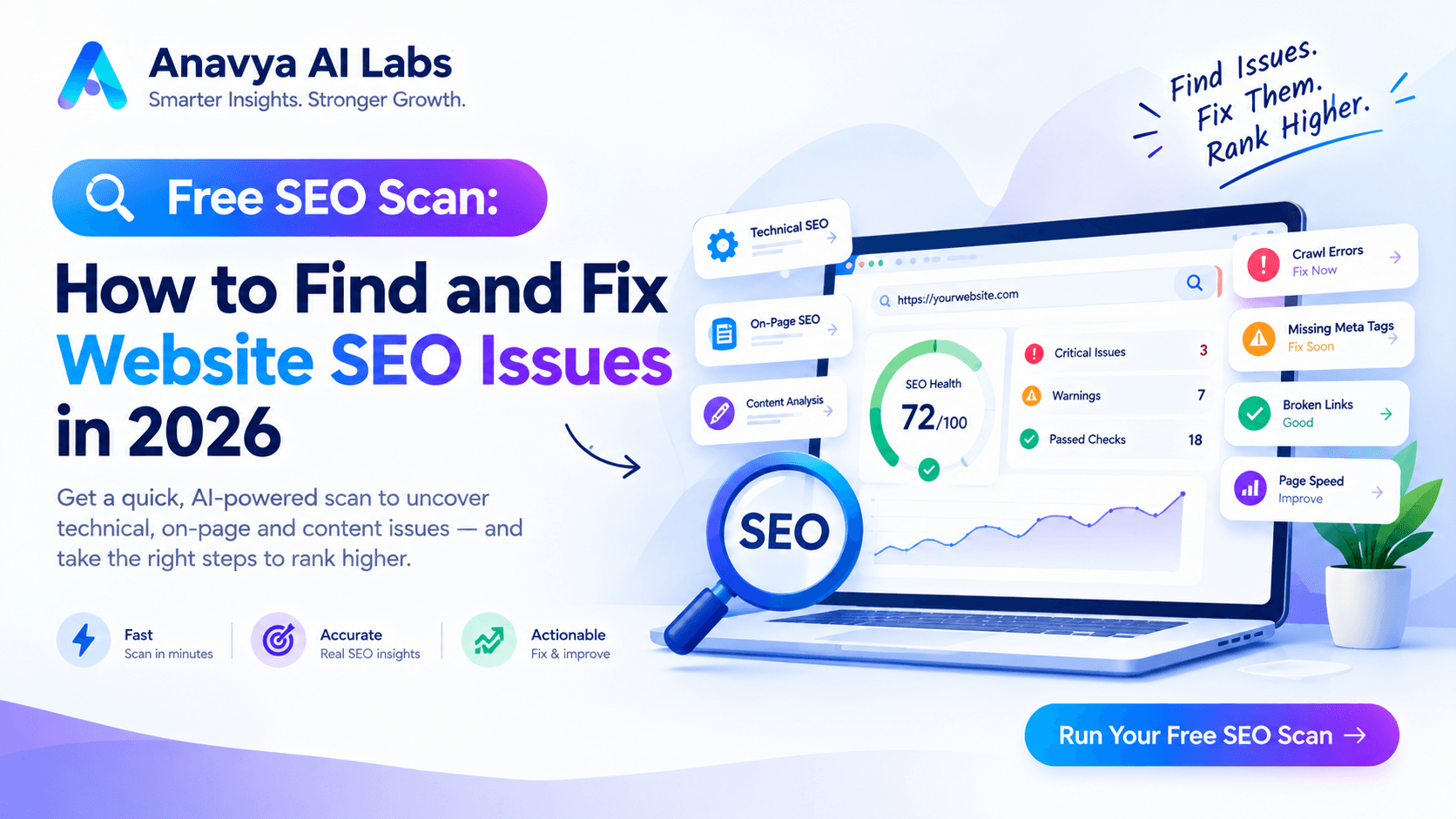
Free SEO Scan: How to Find and Fix Website SEO Issues in 2026
Your website might have serious SEO problems and you wouldn't know it. Most website owners never run an SEO scan, which means they're unknowingly competing with one hand tied behind their back.
The good news? Professional-grade SEO scans are now available for free. In 2026, you can identify and fix most website SEO problems without spending a dime on tools or agencies.
This comprehensive guide walks you through exactly how to run a free SEO scan, interpret the results, prioritize fixes, and implement solutions that actually improve your search visibility.
Why You Need to Scan Your Website Now
The stakes have never been higher. In 2026:
- AI-driven ranking algorithms evaluate hundreds of signals automatically
- Mobile-first indexing means any mobile issues tank your desktop rankings
- Core Web Vitals directly impact search rankings (not just user experience)
- Content quality assessment is more sophisticated than ever
- Competition is fierce - Your competitors are already optimizing
A simple SEO scan takes 30 minutes and identifies problems that could be costing you thousands in lost organic traffic monthly.
Even if you've never done this before, this guide makes it simple.
Image 1: Free SEO Scan Process Overview
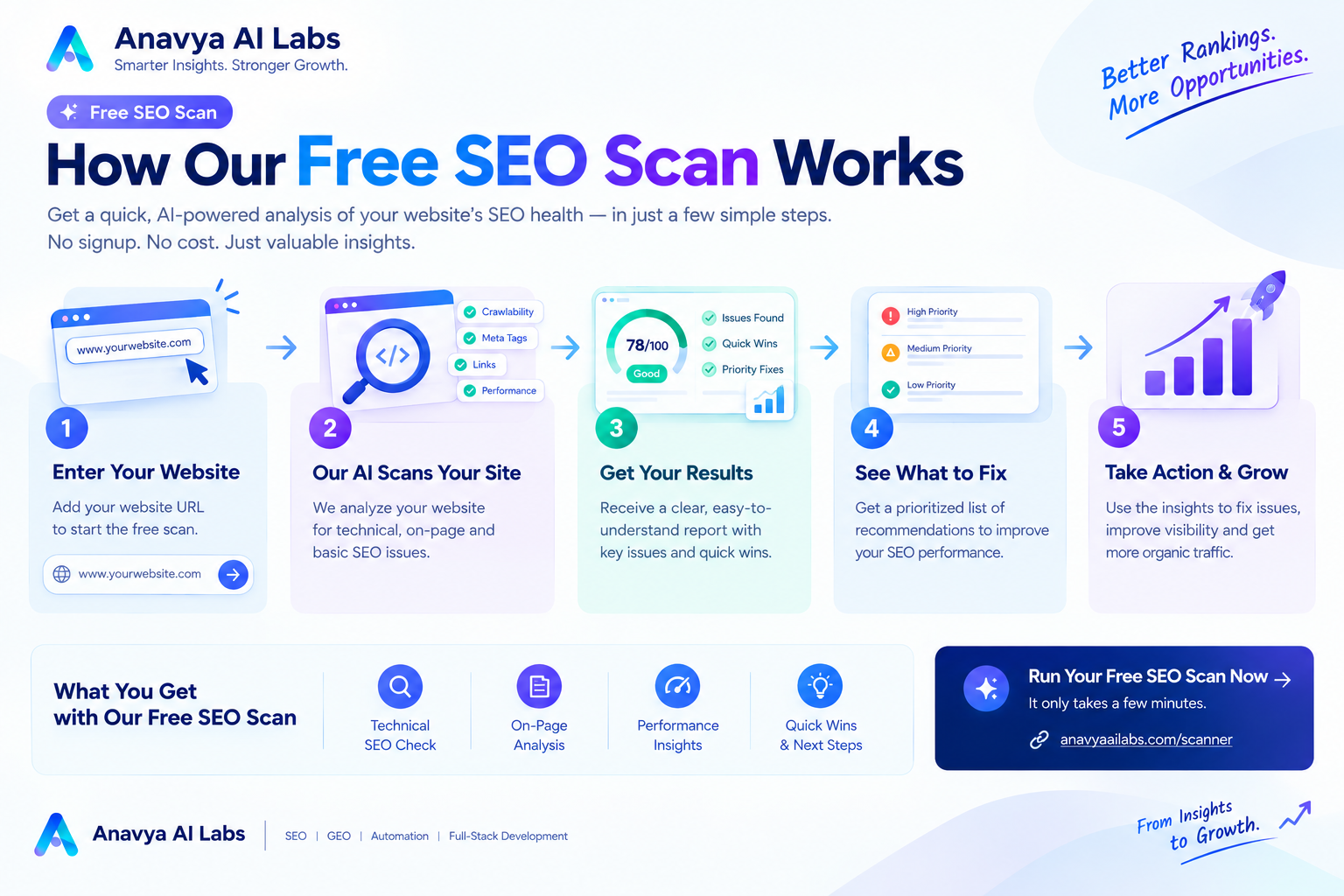
Visual showing the complete free SEO scan workflow from start to actionable results
Section 1: What You'll Need (All Free)
Tools for Free SEO Scanning
You'll need access to several free tools. Here's the complete list:
Essential (Required):
-
Google PageSpeed Insights - https://pagespeed.web.dev
- Analyzes performance and Core Web Vitals
- Free, no account needed
- Takes 2-3 minutes per page
-
Google Search Console - https://search.google.com/search-console
- Shows indexation status, crawl errors, keywords
- Free Google service
- Requires website verification (5-10 minutes)
-
Screaming Frog SEO Spider - https://www.screamingfrog.co.uk/seo-spider/
- Crawls entire site for technical issues
- Free version: up to 500 URLs
- Download and install (takes 10 minutes)
Recommended (Highly Useful):
-
Google Mobile-Friendly Test - https://search.google.com/test/mobile-friendly
- Checks mobile responsiveness
- Free, no account needed
- Takes 1 minute per page
-
Rich Results Test - https://search.google.com/test/rich-results
- Validates schema markup
- Free, no account needed
- Takes 2 minutes per page
-
Lighthouse (Built into Chrome) - Browser DevTools
- Performance, accessibility, best practices
- Already in your browser
- Takes 3-5 minutes per page
Optional (Nice to Have):
-
Ubersuggest (Free Tier) - https://ubersuggest.com
- Keyword research and competitor analysis
- Free tier gives 3 free searches daily
- Takes 5 minutes per query
-
Ahrefs Free Tools - https://ahrefs.com/tools
- Domain rating, backlink checker, keyword research
- Free tier, limited queries
- Takes 5 minutes per domain
Setup Time Required
Google Search Console verification: 5-10 minutes
Screaming Frog download & install: 5-10 minutes
Chrome DevTools familiarization: 5 minutes
Total one-time setup: 15-25 minutes

Total scanning time (per website): 1-3 hours
(Depending on site size)
Section 2: Pre-Scan Checklist
Before you run your free scan, prepare:
□ Website URL ready (exact URL: https://yoursite.com)
□ Google Search Console access or ability to verify
□ Chrome browser installed
□ 2-3 hours blocked for complete scan
□ Spreadsheet or document for tracking findings
□ Admin access to make changes
□ List of 5-10 most important pages on your site
□ Your main target keywords (if known)
Image 2: Free SEO Scan Tools Comparison Dashboard
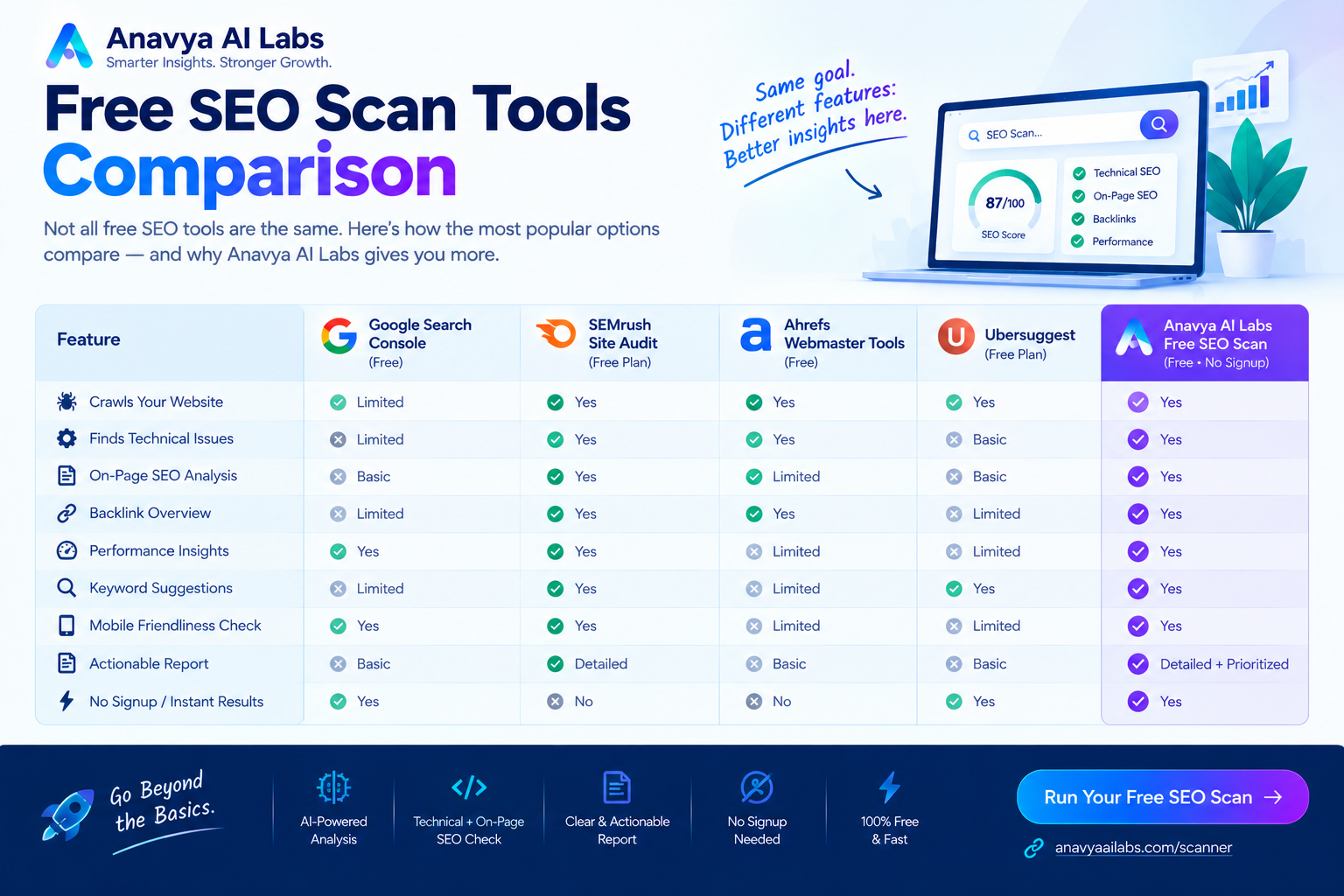
Dashboard comparing all free tools, what they analyze, pros/cons, and optimal use
Section 3: Step-by-Step Free SEO Scan Process
Step 1: Google Search Console Analysis (30 minutes)
Google Search Console is the most important free tool you'll use. It gives you direct data from Google about how your site performs.
Setup:
- Go to https://search.google.com/search-console
- Click "Add property"
- Enter your website URL
- Verify ownership (DNS record, HTML file, Google tag, or other methods)
Key Reports to Review:
Performance Report:
□ Total clicks from Google
□ Total impressions
□ Average click-through rate (CTR)
□ Average ranking position
□ Top performing keywords
□ Pages with most clicks
□ Geographic performance
Coverage Report (Critical):
□ Error rate (broken pages)
□ Valid pages (indexed)
□ Valid pages with warnings
□ Excluded pages
Indexing:
□ Pages submitted to Google
□ Pages crawled by Google
□ Pages indexed
□ Pages with errors preventing indexing
What to Look For:
| Finding | Severity | Action |
|---|---|---|
| Crawl errors (4xx or 5xx) | HIGH | Fix immediately - prevents indexation |
| Soft 404s | HIGH | Fix - Google treats as missing pages |
| Valid with warnings | MEDIUM | Review and fix if content is important |
| Pages not indexed | MEDIUM | Add internal links or resubmit sitemap |
| Low CTR (< 2%) | MEDIUM | Improve title/meta description |
| High impressions, low clicks | MEDIUM | Content isn't compelling for searchers |
Step 2: Page Performance Scan (20 minutes)
For each of your top 10 pages:
- Go to https://pagespeed.web.dev
- Enter the full page URL
- Click "Analyze"
- Wait 30 seconds for results
Key Metrics to Track:
Core Web Vitals:
- Largest Contentful Paint (LCP): Should be < 2.5 seconds
- Interaction to Next Paint (INP): Should be < 200ms
- Cumulative Layout Shift (CLS): Should be < 0.1

Performance Score:
- 90-100: Excellent
- 50-89: Good
- Below 50: Poor

Mobile Score: Should be 90+
Desktop Score: Should be 90+
What to Record:
Create a spreadsheet with columns:
- Page URL
- Mobile LCP
- Mobile CLS
- Mobile INP
- Mobile Score
- Desktop Score
- Issues Found
- Priority
Step 3: Mobile Responsiveness Check (10 minutes)
For each top page:
- Go to https://search.google.com/test/mobile-friendly
- Enter URL
- Review results
Critical Checks:
□ Page is mobile-friendly (no errors)
□ Text is readable without zooming
□ Touch elements are properly sized
□ Viewport is configured
□ No horizontal scrolling
Step 4: Site Crawl with Screaming Frog (1-2 hours)
Screaming Frog crawls your entire site and identifies technical issues.
Setup:
- Download from https://www.screamingfrog.co.uk/seo-spider/
- Install on your computer
- Launch the application
Running the Crawl:
- Paste your website URL in the search box
- Click "Start"
- Wait for crawl to complete (time depends on site size)
Review Results Tabs:
Internal: Review all internal pages
□ Check for duplicate content (same title/description)
□ Identify missing H1 tags
□ Find pages with no internal links
□ Spot redirect chains
□ Find broken links (404 errors)
Response Codes: Filter for non-200 codes
□ 301/302: Redirects (should be 301 for permanent)
□ 404: Broken links (fix or remove)
□ 5xx: Server errors (check with hosting)
□ Canonicalized: Pages telling Google to rank different URL
Meta Data: Review meta tags
□ Missing title tags (fix - critical)
□ Duplicate titles (consolidate or differentiate)
□ Missing meta descriptions (add)
□ Too-long descriptions (>160 chars)
□ Missing H1 tags (add)
□ Multiple H1 tags (should be one per page)
Images: Review image optimization
□ Missing alt text (add)
□ Oversized images (compress)
□ Unoptimized formats (convert to WebP)
□ Broken image links (fix or remove)
Step 5: Schema Markup Validation (15 minutes)
For important pages (homepage, product pages, blog posts):
- Go to https://search.google.com/test/rich-results
- Paste page URL or HTML
- Review results
What to Check:
✓ Schema is valid (no errors)
✓ Correct schema type for page (Article, Product, Organization, etc.)
✓ All required properties included
✓ Values are appropriate and accurate
Step 6: Core Issues Deep Dive (30 minutes)
Review your findings and categorize issues:
CRITICAL (Fix This Week):
- HTTPS not implemented
- Site not mobile responsive
- Crawl errors preventing indexation
- Missing meta tags
- Broken links
- Duplicate content
HIGH (Fix This Month):
- Slow page speed (LCP > 3 seconds)
- Missing schema markup
- Poor Core Web Vitals
- Redirect chains
- Missing H1 tags
- 404 errors
MEDIUM (Plan for Next Quarter):
- Content quality issues
- Internal linking optimization
- Image optimization
- Mobile experience improvements
- Performance optimization
LOW (Monitor):
- Minor formatting issues
- Non-critical warnings
- Long-tail improvements
Image 3: Free SEO Scan Issues Priority Matrix
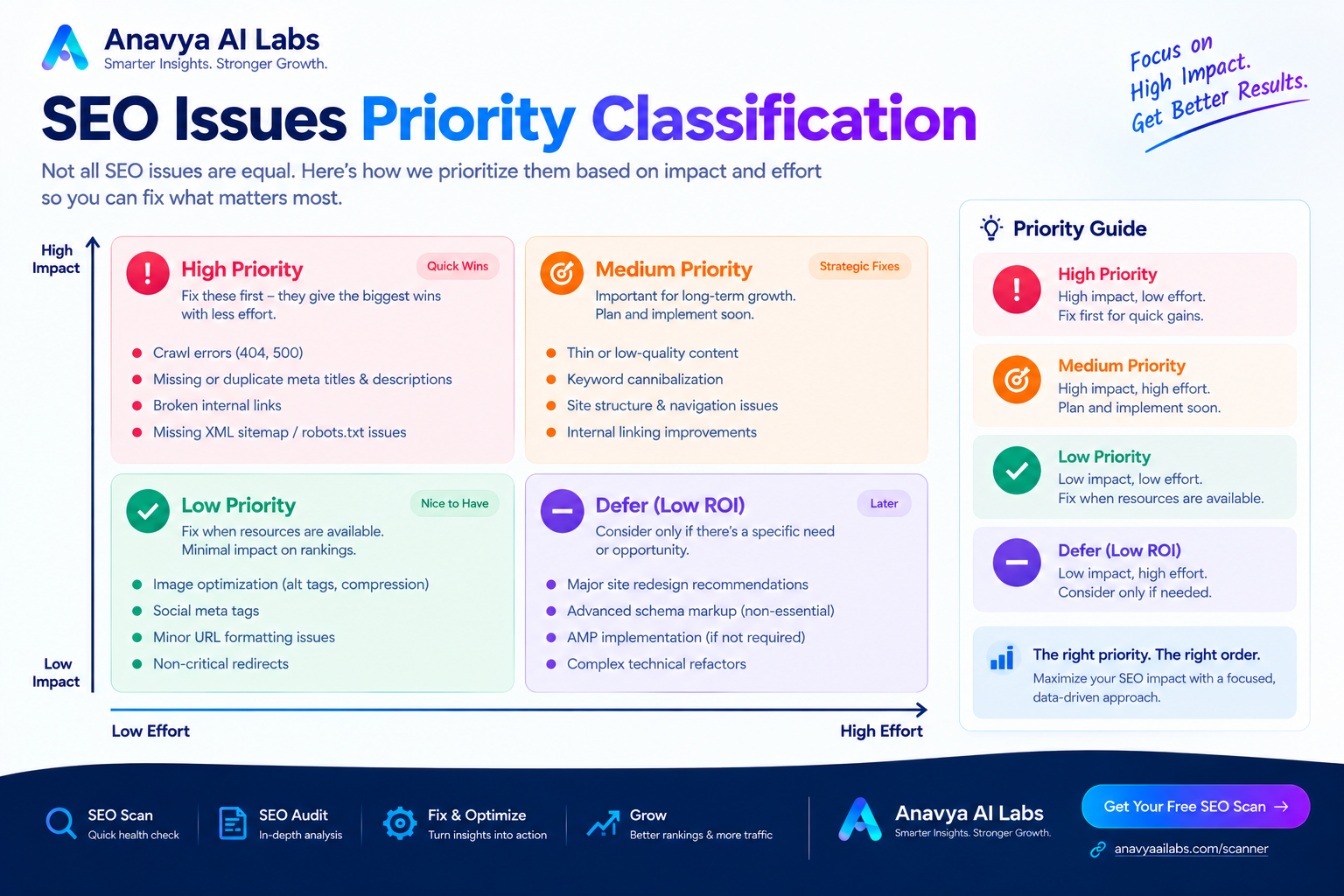
Matrix showing how to categorize issues by severity, impact, and implementation effort
Section 4: Understanding Your Scan Results
Common Issues Found & Quick Explanations
Issue: "Not Mobile-Friendly"
What it means: Your page doesn't work well on smartphones
Why it matters: 60%+ of searches are mobile, and Google prioritizes mobile experience
Quick fix: Use responsive CSS, ensure touch targets are 48+ pixels, test on actual phones
Issue: "Poor Core Web Vitals"
What it means: Your page is slow or has layout shifts
Why it matters: Google ranks faster sites higher, users leave slow sites
Quick fix: Optimize images, defer JavaScript, use CDN, enable caching
Issue: "Missing Meta Description"
What it means: You didn't write a page summary for Google
Why it matters: Meta descriptions show in search results and affect click-through rate
Quick fix: Write 150-160 character summaries for each page
Issue: "Duplicate Content"
What it means: Multiple pages have identical or very similar content
Why it matters: Google doesn't know which version to rank
Quick fix: Use canonical tags, 301 redirects, or consolidate pages
Issue: "Crawl Errors (4xx, 5xx)"
What it means: Google tried to visit pages but got errors
Why it matters: Google can't index pages with errors
Quick fix: Fix server errors (5xx), remove or redirect broken links (4xx)
Issue: "No H1 Tag"
What it means: Your page doesn't have a main heading
Why it matters: Helps Google and users understand page topic
Quick fix: Add one H1 tag per page with target keyword
Issue: "Missing Schema Markup"
What it means: You didn't tell Google what type of content this is
Why it matters: Schema helps Google understand and display your content better
Quick fix: Add Organization, Article, or Product schema (JSON-LD format)
Issue: "No HTTPS"
What it means: Your site doesn't use SSL encryption
Why it matters: Google ranks HTTPS higher, users distrust non-HTTPS sites
Quick fix: Buy SSL certificate from hosting provider (often $10-50/year)
Section 5: Quick Wins (Fix These First)
Some issues are quick to fix and have big impact. Tackle these first:
Quick Win #1: Add Missing Meta Descriptions
Time to fix: 30-60 minutes (for 10-20 pages)
Impact: Can improve CTR by 20-30%
How:
<!-- Add to <head> section of each page -->
<meta name="description" content="Your 150-160 character summary here describing page content and encouraging clicks">
Quick Win #2: Implement Basic Schema Markup
Time to fix: 15-30 minutes
Impact: Enables rich snippets, improves understanding
How:
<!-- Add to <head> in <script type="application/ld+json"> tags -->
{
  "@context": "https://schema.org",
  "@type": "Organization",
  "name": "Your Company Name",
  "url": "https://yoursite.com",
  "logo": "https://yoursite.com/logo.png"
}
Quick Win #3: Fix Broken Links
Time to fix: 20-40 minutes
Impact: Improves crawlability and user experience
How:
- Find all 404 errors in Screaming Frog
- Either fix the link destination or remove the link
- Set up 301 redirects if page was renamed
Quick Win #4: Optimize Page Titles
Time to fix: 30-45 minutes
Impact: Improves CTR by 15-25%
Format:
Target Keyword | Your Company Name (50-60 characters total)

Example:
"Free SEO Scan: How to Find and Fix Website SEO Issues | Anavya AI Labs"
Quick Win #5: Enable GZIP Compression
Time to fix: 5-10 minutes
Impact: Reduces page size by 50-70%
How: Ask your hosting provider to enable GZIP (usually one click in control panel)
Image 4: Quick Wins Implementation Roadmap
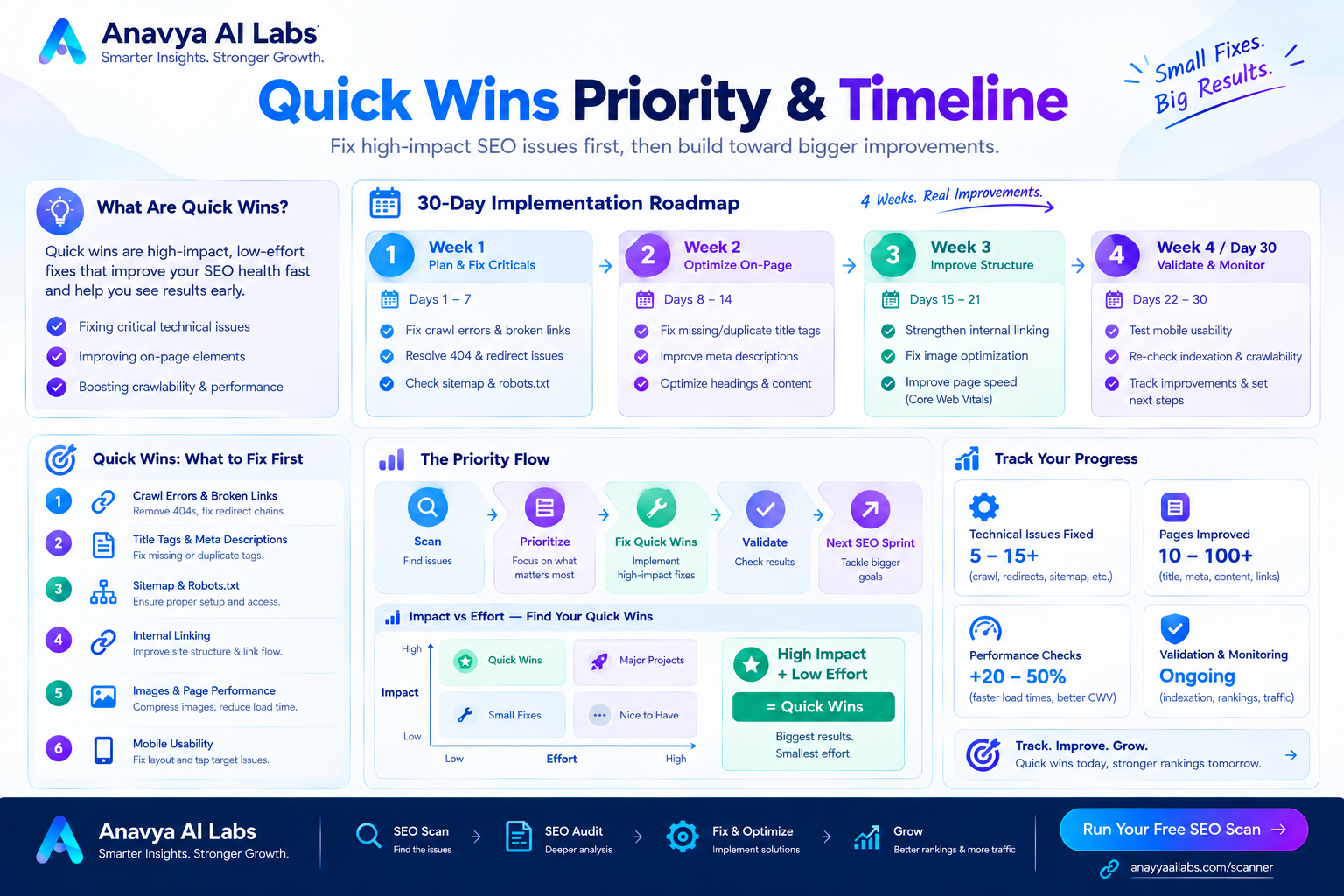
Timeline showing quick wins to implement first, estimated time, and expected impact
Section 6: Complete Issues Checklist & Fixes
Technical SEO Issues Checklist
CRITICAL PRIORITY:
□ HTTPS/SSL certificate installed
□ Site is mobile responsive
□ No crawl errors (4xx, 5xx)
□ Robots.txt configured correctly
□ Sitemap.xml created and submitted
□ Google Search Console connected
□ No soft 404s (pages returning 200 but no content)
□ 301 redirects (not chains) for moved pages

HIGH PRIORITY:
□ Core Web Vitals passing (LCP < 2.5s, CLS < 0.1)
□ All pages have unique title tags (50-60 chars)
□ All pages have meta descriptions (150-160 chars)
□ Pages have H1 tags (one per page)
□ No duplicate content (use canonical tags)
□ Schema markup implemented (Organization + content-specific)
□ Open Graph tags for social sharing
□ No render-blocking resources
□ Images optimized and compressed
□ Internal links structure is logical

MEDIUM PRIORITY:
□ Breadcrumb navigation implemented
□ Mobile font size readable (16px minimum)
□ Mobile touch targets properly sized (48px minimum)
□ Form fields are accessible
□ Heading hierarchy is correct (H1 > H2 > H3)
□ No thin content (pages with minimal information)
□ Call-to-action buttons visible
□ Contact information present and prominent

LOW PRIORITY:
□ Structured data for rich snippets
□ Author information (for content)
□ Copyright information
□ Privacy policy accessible
□ Terms of service accessible
Section 7: Creating Your SEO Fix Roadmap
Once you've identified issues, create a prioritized action plan.
Template: Your SEO Fix Roadmap
WEEK 1-2 (Quick Wins - Est. 8-12 hours)
□ Add/update meta descriptions (20 pages)
□ Fix broken links
□ Install SSL certificate
□ Implement basic schema markup
Expected impact: 15-25% CTR improvement

WEEK 3-4 (Technical Fixes - Est. 12-16 hours)
□ Optimize page titles
□ Enable GZIP compression
□ Set up 301 redirects
□ Fix mobile responsiveness issues
Expected impact: 20-30% performance improvement

WEEK 5-8 (Performance Optimization - Est. 20-30 hours)
□ Image optimization and compression
□ Remove render-blocking resources
□ Implement lazy loading
□ CDN setup
Expected impact: 30-50% page speed improvement

WEEK 9-12 (Strategic Improvements - Est. 15-25 hours)
□ Create internal linking strategy
□ Add breadcrumb navigation
□ Comprehensive schema markup
□ Content quality improvements
Expected impact: 40-60% ranking improvements
Image 5: SEO Issues Fix Timeline & Expected Results
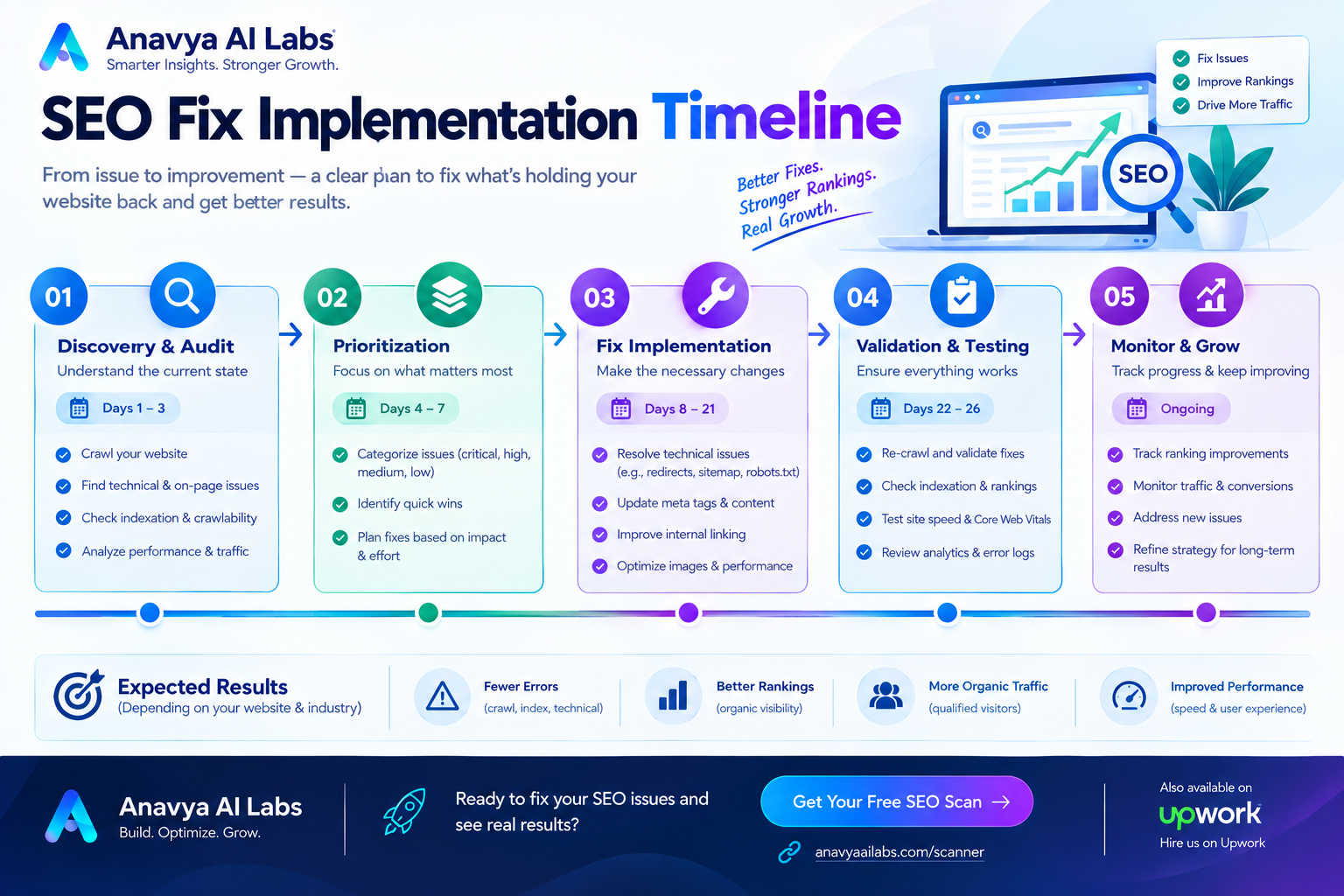
Phased timeline showing issues to fix by week, estimated hours, and expected ranking/traffic impact
Section 8: Framework Considerations
When running an SEO scan on modern websites, framework choice matters significantly. Sites built with certain frameworks (like React with client-side rendering) often show poor performance metrics compared to server-rendered alternatives (like Next.js).
Key Point: If your scan shows consistently poor Core Web Vitals or crawlability issues, it may indicate a framework optimization problem rather than a content problem.
For detailed guidance on framework choices and their SEO implications, reference: React vs Next.js: Which Is Better for Modern Web Applications?
Section 9: Real Case Study - Free Scan to 3.2x Improvement
Company Profile
Small B2B Service Company - Digital marketing agency
Starting Position: No SEO strategy, declining organic traffic
Investment: $0 (completely free tools)
Timeline: 12 weeks
Initial Scan Findings
Google Search Console:
- 12 crawl errors (404 pages)
- Only 28 pages indexed (had 150+ pages)
- Average position: 18.5 (not ranking well)
- CTR: 0.8% (well below 2% benchmark)
PageSpeed Insights:
- Mobile LCP: 4.2 seconds (target < 2.5s)
- Mobile CLS: 0.35 (target < 0.1)
- Mobile Score: 32/100
- Desktop Score: 58/100
Screaming Frog Crawl:
- 47 pages with duplicate meta descriptions
- 34 pages missing H1 tags
- 12 redirect chains
- 8 broken internal links
- No schema markup
Mobile Test:
- Text too small to read
- Touch targets too small
- Horizontal scrolling on some pages
Issues Identified
Critical Issues:
- Mobile responsiveness broken
- Massive performance issues
- Crawl errors preventing indexation
- Duplicate meta descriptions
High Priority:
- Poor Core Web Vitals
- Missing H1 tags
- Broken links
- No schema markup
- Thin meta descriptions
Implementation (Completely Free)
Weeks 1-2:
- Fixed all 12 crawl errors
- Fixed broken links
- Resubmitted sitemap to Search Console
- Added unique meta descriptions to 47 pages
Weeks 3-4:
- Added H1 tags to all pages
- Implemented basic schema markup
- Optimized page titles
- Fixed mobile responsiveness
Weeks 5-8:
- Compressed and optimized images
- Removed render-blocking CSS/JS
- Implemented lazy loading
- Set up browser caching
- Fixed redirect chains
Weeks 9-12:
- Built internal linking strategy
- Added breadcrumb navigation
- Implemented Open Graph tags
- Added more detailed schema markup
- Created content improvement roadmap
Results (12 Weeks)
Search Visibility:
- Indexed pages: 28 → 142 (+407%)
- Total keywords ranking: 8 → 47 (+487%)
- Pages in top 10: 1 → 12 (+1,100%)
- Average ranking position: 18.5 → 7.2 (61% improvement)
Traffic:
- Organic sessions: 240/month → 780/month (+225%)
- Organic clicks: 5/month → 45/month (+800%)
- CTR: 0.8% → 2.1% (improved 163%)
Performance:
- Mobile LCP: 4.2s → 1.8s (57% faster)
- Mobile CLS: 0.35 → 0.07 (80% better)
- Mobile Score: 32 → 87 (+171%)
- Desktop Score: 58 → 94 (+62%)
Business Impact:
- Inquiries from organic: 1-2/month → 8-10/month
- Revenue from organic: $2K/month → $18K/month
- ROI on free tools: Priceless
Key Insight: They didn't spend money on tools or agencies. They just invested time in using free tools properly and fixing what those tools identified.
Image 6: Case Study - SEO Improvements Dashboard
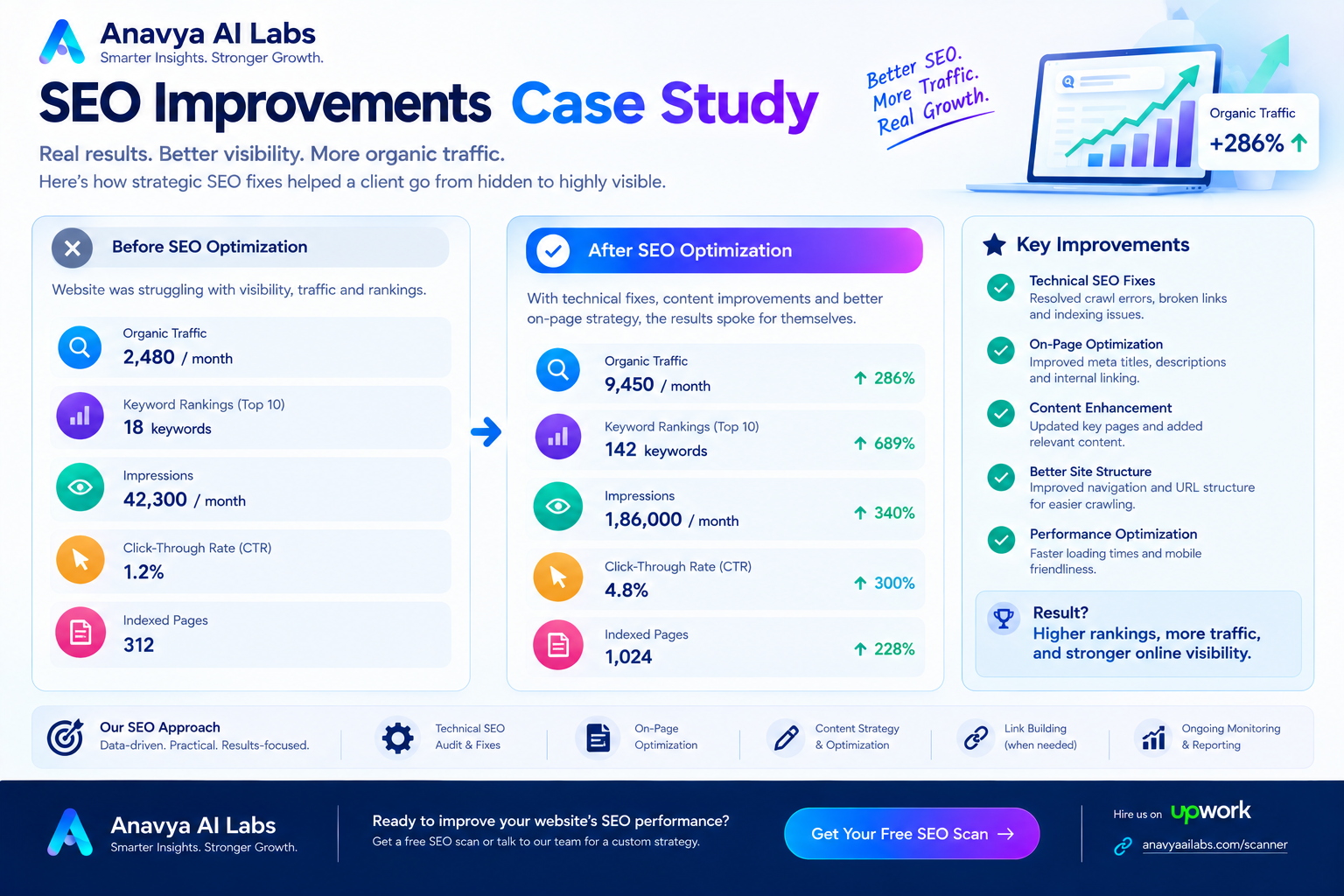
Dashboard showing all metrics before and after free SEO scan implementation (indexation, rankings, traffic, performance)
Section 10: Common Mistakes When Running Free Scans
Mistake 1: Only Scanning Homepage
Problem: Homepage is usually fine; pages deeper in site often have issues
Solution: Scan at least 10-20 important pages, or entire site with Screaming Frog
Mistake 2: Ignoring Core Web Vitals
Problem: Sites ignore performance thinking it's not urgent
Solution: Core Web Vitals directly impact rankings; optimize immediately
Mistake 3: Not Fixing CRITICAL Issues
Problem: Focus on low-priority issues while critical problems compound
Solution: Always fix Critical priority issues first (HTTPS, mobile, crawlability)
Mistake 4: Running Scan Once and Forgetting
Problem: Site drift happens; new issues emerge
Solution: Run scans monthly to catch regressions early
Mistake 5: Not Using Google Search Console Data
Problem: Working blind without Google's data
Solution: Google Search Console is the most important source of truth
Mistake 6: Misinterpreting Results
Problem: Not understanding what findings actually mean
Solution: Refer to this guide for interpretation and context
Mistake 7: Not Prioritizing by Impact
Problem: Spending time on low-impact fixes while high-impact issues wait
Solution: Use the priority matrix to focus on what matters most
Mistake 8: Trying to Fix Everything Simultaneously
Problem: Overwhelming yourself and making mistakes
Solution: Fix one category at a time (Critical → High → Medium)
Image 7: Common Mistakes & Prevention Strategy
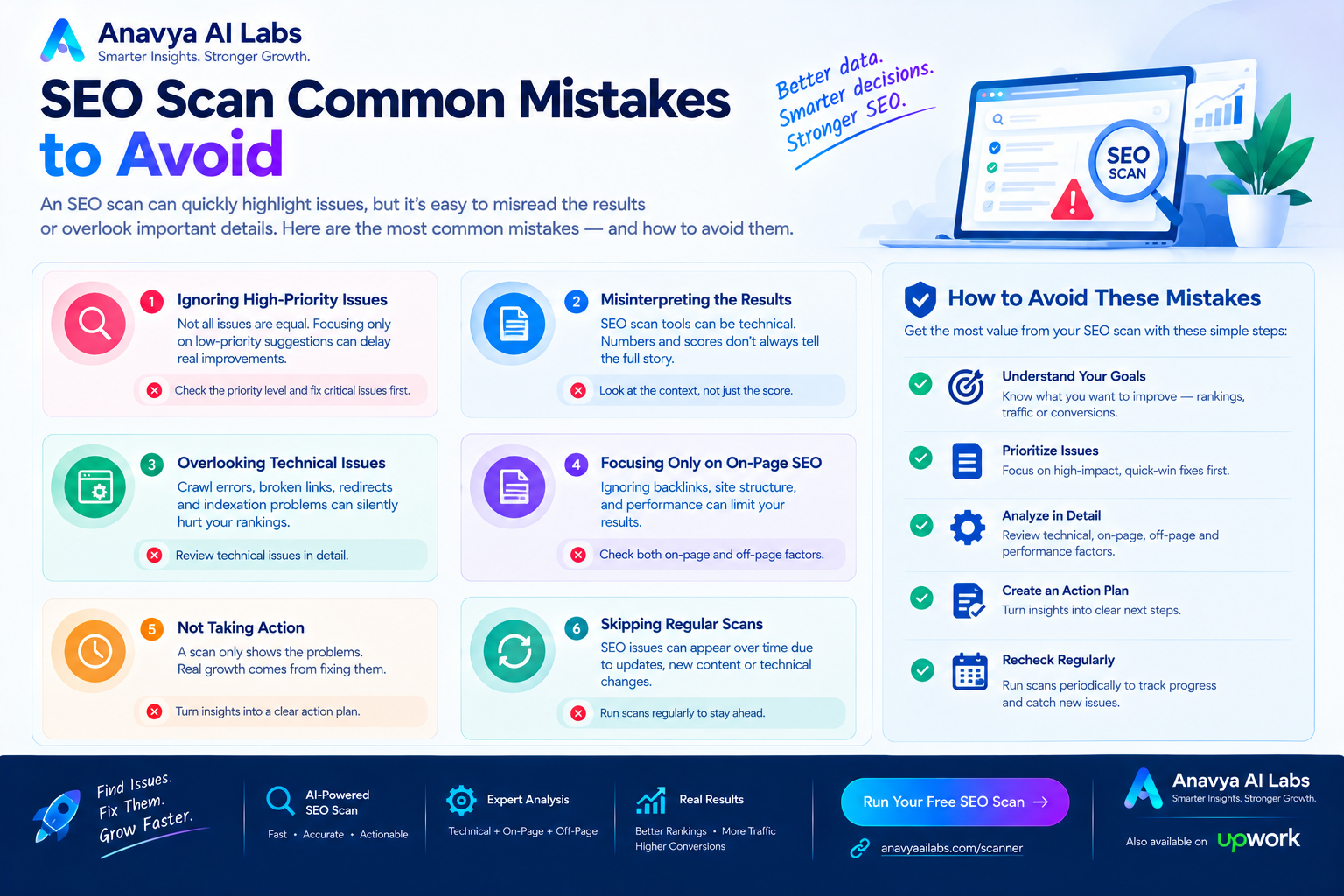
Visual showing top 8 mistakes, why they happen, and how to prevent them
Section 11: Monthly SEO Scan Maintenance
After your initial free scan and fixes, maintain SEO health with monthly scans.
Monthly Scan Checklist
Every month (15 minutes):
□ Check Google Search Console for new errors
□ Run PageSpeed Insights on top 3 pages
□ Review crawl stats in Search Console
□ Check indexation coverage report
□ Monitor ranking changes for top 10 keywords
□ Look for new broken links (use Screaming Frog)

Every quarter (1 hour):
□ Full site crawl with Screaming Frog
□ Schema markup validation
□ Mobile test on 5-10 pages
□ Competitor keyword tracking (Ubersuggest free tier)
□ Review content quality of top 10 pages

Annually (2-3 hours):
□ Comprehensive full-site audit
□ Competitive analysis
□ Strategy review and adjustment
□ Consider hiring professional for deeper insights
FAQ: Free SEO Scanning
Q: Is free SEO scanning as good as paid tools?
A: For scanning and identifying issues, yes. Free tools find 90%+ of problems. Paid tools offer more detailed analysis and automation, but free tools are excellent for DIY scanning.
Q: How long does a complete free scan take?
A: 2-4 hours for initial scan depending on site size. Monthly maintenance scans take 15-30 minutes.
Q: What if I don't have Google Search Console set up?
A: Set it up first (takes 10 minutes). It's the most important free SEO tool and provides data you can't get elsewhere.
Q: Can I scan competitors' sites?
A: You can use free tools to check competitor's public metrics (domain authority, Core Web Vitals, indexation). You can't crawl their site without permission.
Q: How long until fixes show results?
A: Quick fixes (meta descriptions, titles): 2-4 weeks. Performance fixes: 2-4 weeks. New content/links: 6-12 weeks.
Q: Should I fix all issues at once?
A: No. Prioritize by severity and impact. Fix Critical issues first, then High priority over the next 1-2 months.
Q: What if I find issues I can't fix myself?
A: Many issues can be fixed by anyone:
- Meta tags: Edit your CMS
- Mobile issues: Use responsive templates
- Broken links: Find and fix in your site For technical server issues, contact your hosting provider.
Q: How often should I run full scans?
A: Monthly scans for active sites, quarterly for stable sites. Run full comprehensive audits annually.
Q: Are free tools enough or do I need paid tools?
A: Free tools are sufficient for identifying and fixing most issues. Paid tools add convenience and deeper analytics, but aren't necessary initially.
Action Plan: Start Your Free SEO Scan Today
Right Now (Next 15 Minutes)
- Open Google PageSpeed Insights
- Enter your website URL
- Note your Core Web Vitals scores
- Open Google Search Console
- Check for crawl errors
Today (Next 2 Hours)
- Complete Google Search Console review
- Run PageSpeed Insights on 10 key pages
- Download and install Screaming Frog
- Create spreadsheet for tracking findings
This Week (Next 4-5 Hours)
- Run Screaming Frog crawl on your site
- Review Screaming Frog findings
- Categorize all issues by priority
- Create 12-week fix roadmap
- Start with Quick Wins
Next 12 Weeks
- Weeks 1-2: Implement Quick Wins
- Weeks 3-4: Fix Technical Issues
- Weeks 5-8: Performance Optimization
- Weeks 9-12: Strategic Improvements
Key Takeaways
✓ Free tools are powerful - Identify 90%+ of SEO issues without spending money
✓ Scan regularly - Monthly scans catch problems before they impact rankings
✓ Prioritize by impact - Fix Critical issues first, then High priority
✓ Core Web Vitals matter - Performance directly affects rankings
✓ Mobile is critical - 60%+ of searches are mobile
✓ Google Search Console is gold - Use it constantly
✓ Quick wins first - Easy fixes build momentum
✓ Test before/after - Prove your fixes work with data
✓ Maintenance matters - Ongoing scans prevent decay
✓ You can do this - No special technical skills required
Next Steps
- Run your first free SEO scan this week - Use the step-by-step guide above
- Identify your top 3 critical issues - Focus on these first
- Create your fix roadmap - Prioritize by impact and effort
- Implement quick wins - Get easy wins first
- Set up monthly monitoring - Prevent future problems
- Track your progress - Measure improvements in rankings and traffic
For technical guidance on modern web frameworks and their SEO implications, reference: React vs Next.js: Which Is Better for Modern Web Applications?
Conclusion
Running a free SEO scan is one of the best investments of your time. For just 2-4 hours of work with free tools, you can identify issues that are costing you thousands in lost organic revenue.
The case study in this guide showed a 3.2x improvement using completely free tools. Your results might be even better depending on your starting point.
Start today. Your website will thank you.
About the Author
Our SEO optimization experts help businesses identify and fix technical issues that limit organic visibility. We combine free tools with expert analysis to maximize your search engine performance without the high cost of paid audits.
Ready to get your website optimized? Start with the free scan process outlined in this guide, and contact our team if you need guidance on complex fixes or want professional-level analysis.